상속관계의 클래스에서 부모 클래스가 제공하는 기능이 자식한테 맞지 않을 때 그 method를 재정의 하여 사용하는 것
Override(Overriding)
상속관계의 클래스에서 부모 클래스가 제공하는 기능이 자식한테 맞지 않을 때 그 method를 재정의 하여 사용하는 것
Override된 method는 최우선적으로 호출됨
반환형, method명, 매개변수 같고 하는일만 다르게
접근지정자는 접근이 원활한 쪽으로 변경 가능(광의)
부모 protected -> 자식 protected, public으로 변경가능
부모 public -> 자식 public으로만 가능
jdk 1.5에서는 Compile time 에 Override를 체크할 수 있는 annotation을 제공
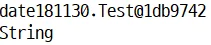
class OverrideEx2 { public static void main(String[] args) { Test t = new Test(); System.out.println(t.toString()); // 객체의 주소값 출력 String str = new String("String"); System.out.println(str.toString()); // "String" 출력 }}class Test {}
객체를 출력하면 객체의 주소가 출력되는 이유는 Object에서 제공하는 toString 메소드를 호출하여 반환되는 값을 출력했기 때문.
annotation
jdk 1.5에서부터 제공하는 문법
클래스 위, 메소드 위, 지역변수 위에 설정
compiler에게 compile시 명령을 부여할 때 사용
클래스가 컴파일 되거나 실행될 때 어노테이션 유무나 어노테이션에 설정된 값을 통해 클래스가 다르게 실행되게 함
@어노테이션명
@Override
메소드가 오버라이드 되었다는 것을 나타냄
메소드 위 사용
@Override
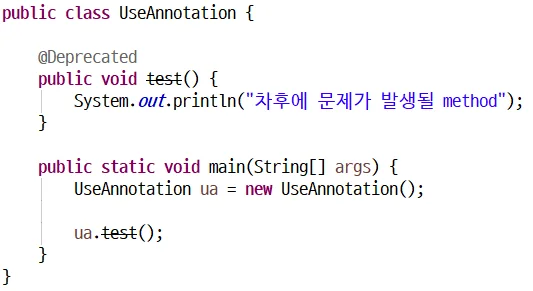
@Deprecated
메소드가 더 이상 사용되지 않음을 나타냄(deprecated)
메소드 위 사용
@Deprecated
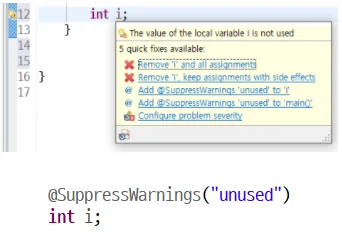
@SuppressWarnings
선언한 곳의 컴파일 경고를 무시
클래스, 메소드, 변수 위에 사용
Warning이 발생하지 않도록 코딩하는게 제일 좋음
쓰지도 않는 변수 만들고 어노테이션으로 숨기는건 안좋은 방식
@SuppressWarnings
// jdk 1.5에서부터 추가된 annotation의 사용 Deprecated, Override, SuppressWarningsimport java.util.ArrayList;import java.util.List;public class UseAnnotation { // 해당 메소드는 차후에 문제를 발생시킬 수 있다. @Deprecated public void test() { System.out.println("차후에 문제가 발생될 method"); } @Override public String toString() { return "안녕하세요"; } // 메소드 위에 설정하면 메소드 안에 있는 모든 경고 상황에 적용 // 여러 경고타입을 한꺼번에 설정하려면 중괄호를 사용 @SuppressWarnings({ "rawtypes", "unused" }) public void temp() { // unused는 변수를 사용하지 않을 때 // @SuppressWarnings("unused") int i = 0; // rawypes : Generic을 사용하지 않을 때 경고 무시 // 변수위에 설정하면 특정변수만 적용 // @SuppressWarnings({ "rawtypes", "unused" }) List l = new ArrayList(); int j = 0; System.out.println(j); } public static void main(String[] args) { UseAnnotation ua = new UseAnnotation(); ua.test(); System.out.println(ua); }}
Override 예제
// 부모 클래스 Person classpublic class Person { private String name; public Person(String name) { this.name = name; } public String coding() { return "코딩합니다."; } public void setName(String name) { this.name = name; } public String getName() { return name; }}
// Person을 상속한 자식클래스 Majorpublic class Major extends Person { public Major(String name) { super(name); } @Override public String coding() { return "수월하게 코딩합니다."; }}
// Person을 상속한 자식클래스 NonMajorpublic class NonMajor extends Person { public NonMajor(String name) { super(name); } @Override public String coding() { return "시간이 조금 걸리지만 코딩합니다."; }}
public class OverrideEx { public static void main(String[] args) { Person young = new Major("오영근"); System.out.println(young.getName()+"은 "+young.coding()); Person someone = new NonMajor("비전공자"); System.out.println(someone.getName()+"는 "+someone.coding()); }}
super
method형식과 키워드형식 두가지로 사용가능
method형식
생성자를 호출
키워드형식
부모 클래스의 변수나 method를 지정하여 사용할 때
super (method 형식)
부모클래스의 생성자를 호출할 때 사용
생성자의 첫 번째 줄에서만 사용가능
모든 생성자의 첫 번째 줄에 부모클래스의 기본생성자를 호출하는 super가 숨어있다.
// 기본생성자 호출super();// 인자있는 생성자 호출super(값, .. );
super (keyword 형식)
부모클래스의 자원(변수, 메소드)이 자식클래스와 같은 이름을 가질 때 부모클래스의 자원을 사용할 때 사용
super는 생성된 객체의 부모 객체 주소
super의 주소는 출력할 수 없다(error), 사용만 가능
클래스의 instance 영역에서만 사용할 수 있다.
super.변수명super.메소드명();
QUIZ
// 생성자 흐름을 this()와 super()를 사용해서 확인해보시오public class RunConst { public static void main(String[] args) { // 아래와 같이 출력되도록 // 부모기본, 부모인자 300, 자식인자 200, 자식기본 // 부모인자 100, 부모기본, 자식기본, 자식인자100 // new SubConst(); // new SubConst(100); }}
public class SuperConst { int i; public SuperConst() { System.out.println("부모의 기본생성자"); } public SuperConst(int i) { this.i = i; System.out.println("부모의 인자생성자, 부모의 i="+i); }}
public class SubConst extends SuperConst{ int i; public SubConst() { System.out.println("자식 기본생성자"); } public SubConst(int i) { System.out.println("자식 인자생성자, 자식의 i="+i); }}