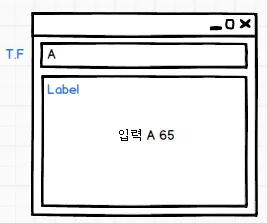
눌린키의 keyCode를 가지고 올 때 KeyEvent클래스의 getKeyCode() 사용
눌린 키의 문자를 가지고 오는 메소드는 getKeyChar()
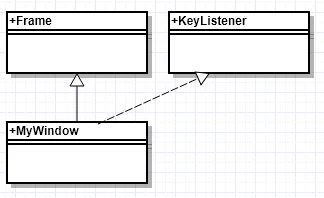
// KeyEvent Handling@SuppressWarnings("serial")// 1.윈도우 컴포넌트 상속, 이벤트 처리 리스너 구현public class UseKeyListener extends Frame implements KeyListener { // 2. 이벤트와 관련있는 컴포넌트 선언 TextField tf; Label lbl; public UseKeyListener() { super("키보드 이벤트 연습"); // 3. 컴포넌트 생성 tf = new TextField(); lbl = new Label("출력창",Label.CENTER); // 4. 배치 add(BorderLayout.NORTH, tf); add(BorderLayout.CENTER, lbl); // 5. 컴포넌트를 이벤트에 등록 tf.addKeyListener( this ); // 6. 윈도우의 크기 설정 setBounds(300, 200, 300, 300); // 7. 가시화 setVisible(true); // 8. 종료처리 addWindowListener(new WindowAdapter() { @Override public void windowClosing(WindowEvent e) { dispose(); } }); } @Override public void keyTyped(KeyEvent e) { // 2. 키가 눌려 정보가 전달되는 순간. 눌린 키의 정보중 문자만 알 수 있다. // 키코드를 알 순 없다. (키코드 != 유니코드) System.out.println("keyTyped"); } @Override public void keyPressed(KeyEvent e) { // 1. 키보드의 키가 눌리는 순간, 키의 정보를 알 수 있다. System.out.println("keyPressed"); } @Override public void keyReleased(KeyEvent e) { // 3. 눌린 키가 정보를 전달하고 다시 올라오는 순간.눌린키의 정보를 알 수 있다. System.out.println("keyReleased"); // 눌린 키의 문자와 코드값을 얻어 출력 Label에 뿌린다. char inputKey = e.getKeyChar(); // keyCode는 키보드 키의 고유값. unicode와 다르게 같은 값이 나온다. int inputCode = e.getKeyCode(); StringBuilder output = new StringBuilder(); output.append("눌린키 문자 : ").append(Character.toString(inputKey)) .append(", 유니코드 : ").append(Integer.toString(inputCode)); lbl.setText(output.toString()); switch(inputCode) { case KeyEvent.VK_ENTER : // Enter키 입력 시 tf 초기화 // jdk 1.6?7? 에서 발생한 버그, TextField, TextArea는 // setText("")를 바로 사용하면 초기화되지 않는다. // 값을 한번 얻어내고 초기화하면 잘 됨, 또는 " "빈문자열 하나로 대치하면 된다. tf.getText(); tf.setText(""); break; case KeyEvent.VK_ESCAPE : // Esc키 입력 시 종료 dispose(); break; } } public static void main(String[] args) { new UseKeyListener(); }}
이벤트 비교
같은 종류의 이벤트가 여러개 발생했을 때 그 이벤트를 구분하여 처리하는 것.
발생객체의 주소로 비교(부모클래스인 EventObject클래스 이용)하는 방법
getSource() : Object
모든 이벤트 객체를 다 비교할 수 있다.
ActionEvent만 발생객체의 Label로 비교하는 기능이 추가되었음
getActionCommand() : String
컴포넌트의 라벨로 가져오는 메서드로 비교가 가능하다.
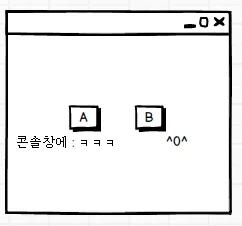
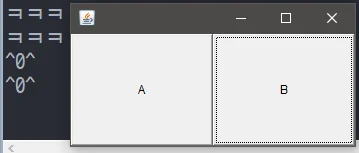
@SuppressWarnings("serial")public class ButtonDesign extends Frame { private Button btnA; private Button btnB; public ButtonDesign() { btnA = new Button("A"); btnB = new Button("B"); setLayout(new GridLayout(1, 2)); add(btnA); add(btnB); ButtonEventHandler beh = new ButtonEventHandler( this ); btnA.addActionListener(beh); btnB.addActionListener(beh); setBounds(300,200,300,150); setVisible(true); addWindowListener(new WindowAdapter() { @Override public void windowClosing(WindowEvent e) { dispose(); } }); } public Button getBtnA() { return btnA; } public Button getBtnB() { return btnB; } public static void main(String[] args) { new ButtonDesign(); }}
public class ButtonEventHandler implements ActionListener { private ButtonDesign design; public ButtonEventHandler(ButtonDesign design) { this.design = design; } @Override public void actionPerformed(ActionEvent e) { // 1. 주소로 비교하기, 이벤트를 발생한 객체와 컴포넌트 객체를 비교 if (e.getSource() == design.getBtnA()) { System.out.println("ㅋㅋㅋ"); } if (e.getSource() == design.getBtnB()) { System.out.println("^0^"); } // 2. 라벨로 비교하기 // ActionEvent 발생객체의 Label과 컴포넌트의 Lable 비교 if (e.getActionCommand().equals("A")) { System.out.println("ㅋㅋㅋ"); } if (e.getActionCommand().equals("B")) { System.out.println("^0^"); } }}
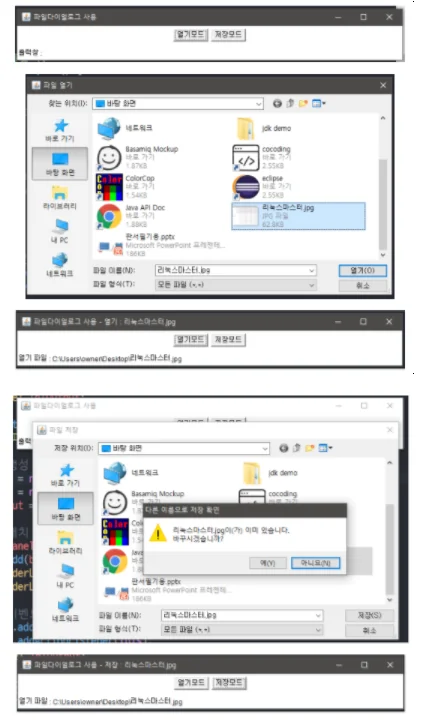
FileDialog
파일을 열거나 저장하기 위해 제공하는 창
OS에서 제공하는 FileDialog 사용
Window Component이므로 set Visible 사용
dialog들은 부모가 있어야함(자식창을 띄우기 위한 부모)
default는 modal(자식창 종료전까지 부모창 작업 불가)
/** * 같은 종류의 이벤트가 여러개 발생하면, * 그 이벤트를 비교하여 처리하는 방법<br> * 1. 이벤트를 발생시킨 객체의 주소비교 - 모든 이벤트 사용가능 : getSource() <br> * 2. 이벤트 발생시킨 객체의 Label을 비교하는 방법 - ActionEvent만 가능 : * getActionCommand() <br> */@SuppressWarnings("serial")// 1. Window Component 상속, Event처리 Listener를 구현public class EventCompare extends Frame implements ActionListener { // 2. 이벤트와 관련있는 Component를 선언 private Button btnOpen; private Button btnSave; private Label lblOutput; public EventCompare() { super("파일다이얼로그 사용"); // 3. 생성 btnOpen = new Button("열기모드"); btnSave = new Button("저장모드"); lblOutput = new Label("출력창 : "); // 4. 배치 Panel panel = new Panel(); // Container Component panel.add(btnOpen); panel.add(btnSave); add(BorderLayout.CENTER, panel); add(BorderLayout.SOUTH, lblOutput); // 5. 이벤트 등록 btnOpen.addActionListener(this); btnSave.addActionListener(this); // 6. 윈도우 크기 설정 setBounds(100, 100, 700, 100); // 7. 가시화 setVisible(true); // 종료처리 addWindowListener(new WindowAdapter() { @Override public void windowClosing(WindowEvent e) { dispose(); } }); } @Override public void actionPerformed(ActionEvent e) { /////////////////// 주소 비교 ////////////////////// /*if (e.getSource() == btnOpen) { System.out.println("열기"); } if (e.getSource() == btnSave) { System.out.println("저장"); }*/ //////////////////////////////////////////////////// /////////////////// Label 비교 ////////////////////// String label = e.getActionCommand(); if (label.equals("열기모드")) { System.out.println("열기"); FileDialog fdOpen = new FileDialog(this, "파일 열기", FileDialog.LOAD); // 가시화 fdOpen.setVisible(true); String path = fdOpen.getDirectory(); String name = fdOpen.getFile(); if (name != null) { // 선택한 파일이 있을 때 lblOutput.setText("열기 파일 : "+path+name); // 타이틀바의 내용 변경 setTitle("파일다이얼로그 사용 - 열기 : "+name); } } if (label.equals("저장모드")) { System.out.println("저장"); FileDialog fdSave = new FileDialog(this, "파일 저장", FileDialog.SAVE); // 가시화 fdSave.setVisible(true); String path = fdSave.getDirectory(); String name = fdSave.getFile(); if (name != null) { lblOutput.setText("열기 파일 : "+path+name); // 타이틀바의 내용 변경 setTitle("파일다이얼로그 사용 - 저장 : "+name); } } //////////////////////////////////////////////////// } public static void main(String[] args) { new EventCompare(); }}
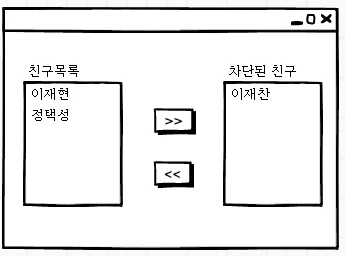
이벤트 처리 연습
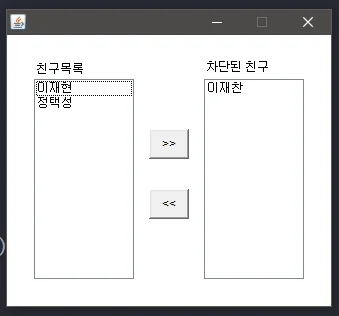
"<<"나 ">>" 버튼 누르면 모든 리스트 아이템이 이동
목록의 이름을 클릭하면 하나의 아이템이 이동
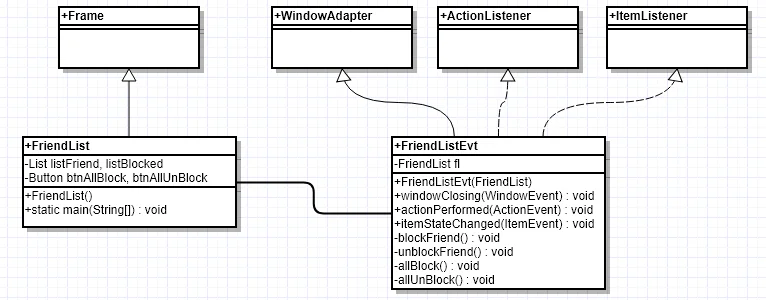
public class FriendList extends Frame { private List listFriend, listBlocked; private Button btnAllUnblock, btnAllBlock; public FriendList() { Label lblFrined = new Label("친구목록"); Label lblBlocked = new Label("차단된 친구"); btnAllUnblock = new Button("<<"); btnAllBlock = new Button(">>"); listFriend = new List(); listFriend.add("이재찬"); listFriend.add("이재현"); listFriend.add("정택성"); listBlocked = new List(); setLayout(null); lblFrined.setBounds(30, 50, 50, 20); add(lblFrined); lblBlocked.setBounds(200, 50, 80, 20); add(lblBlocked); listFriend.setBounds(30, 70, 100, 200); add(listFriend); listBlocked.setBounds(200, 70, 100, 200); add(listBlocked); btnAllBlock.setBounds(145,120,40,30); add(btnAllBlock); btnAllUnblock.setBounds(145,180,40,30); add(btnAllUnblock); FriendEventHandler feh = new FriendEventHandler(this); listFriend.addItemListener(feh); listBlocked.addItemListener(feh); btnAllBlock.addActionListener(feh); btnAllUnblock.addActionListener(feh); addWindowListener(feh); setBounds(400, 300, 330, 300); setResizable(false); setVisible(true); } public List getListFriend() { return listFriend; } public List getListBlocked() { return listBlocked; } public Button getBtnAllUnblock() { return btnAllUnblock; } public Button getBtnAllBlock() { return btnAllBlock; } public static void main(String[] args) { new FriendList(); }}
public class FriendEventHandler extends WindowAdapter implements ItemListener, ActionListener { private FriendList fl; public FriendEventHandler(FriendList fl) { this.fl = fl; } @Override public void actionPerformed(ActionEvent e) { if (e.getSource() == fl.getBtnAllBlock()) { allBlock(); } if (e.getSource() == fl.getBtnAllUnblock()) { allUnblock(); } } @Override public void itemStateChanged(ItemEvent e) { if (e.getSource() == fl.getListFriend()) { blockFriend(); } if (e.getSource() == fl.getListBlocked()) { unblockFriend(); } } @Override public void windowClosing(WindowEvent e) { fl.dispose(); } public void blockFriend() { String selectedPerson = fl.getListFriend().getSelectedItem(); fl.getListFriend().remove(selectedPerson); fl.getListBlocked().add(selectedPerson); } public void unblockFriend() { String selectedPerson = fl.getListBlocked().getSelectedItem(); fl.getListBlocked().remove(selectedPerson); fl.getListFriend().add(selectedPerson); } public void allBlock() { String[] name = fl.getListFriend().getItems(); for(int i=0; i<name.length; i++) { name[i] = fl.getListFriend().getItem(i); } fl.getListFriend().removeAll(); for(int i=0; i<name.length; i++) { fl.getListBlocked().add(name[i]); } } public void allUnblock() { int itemCnt = fl.getListBlocked().getItemCount(); String[] name = new String[itemCnt]; for(int i=0; i<itemCnt; i++) { name[i] = fl.getListBlocked().getItem(i); } fl.getListBlocked().removeAll(); for(int i=0; i<itemCnt; i++) { fl.getListFriend().add(name[i]); } }}
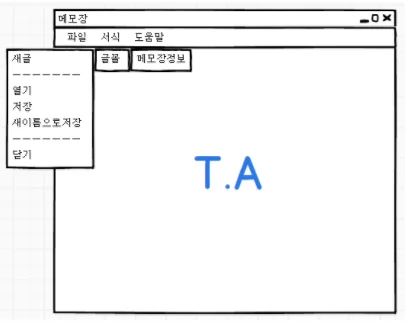
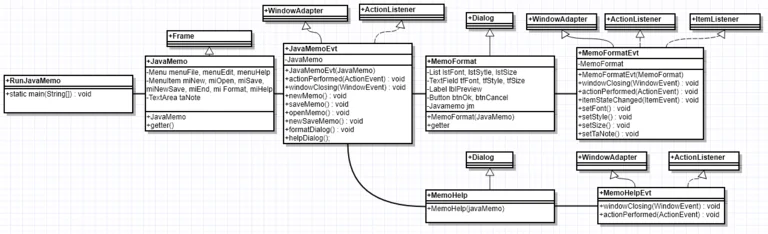
메모장 만들기
Has-A로 메모장 생성
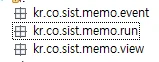
업무에 따라 패키지를 분할
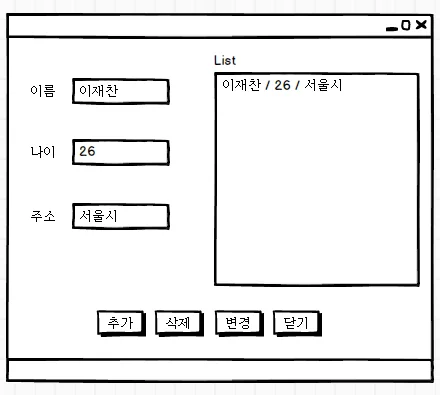
숙제풀이
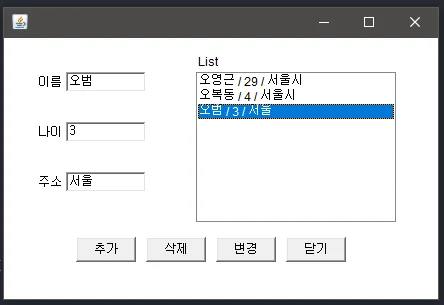
추가가 눌리면 이름, 나이, 주소를 List에 추가
추가하고 T.F를 초기화
리스트의 아이템을 클릭하면 선택한 값이 T.F에 입력
변경이 눌러지면 리스트의 아이템이 선택되었는지 확인 후 T.F의 값으로 해당 값을 수정
삭제가 눌러지면 리스트의 아이템이 선택되었는지 확인 후 T.F의 값과 일치하는 아이템을 삭제