클래스 이름뒤에 Input,OutStream이면 8bit, Reader,Writer면 16bit Stream
Input, OutputStream을 부모로 두면 8bit Stream
DataInputStream / DataOutputStream
FileInputStream / FileOutputStream
ObjectInputStream / ObjectOutputStream
...
Reader, Writer를 부모로 두면 16bit Stream
BufferedReader / BufferedWriter
FileReader / FileWriter
InputStreamReader / OutputStreamWriter
...
8bit Stream과 16bit Stream은 결합하여 사용할 수 있다.
8bit와 16bit를 같이쓰면 속도가 보완이 된다.
8bit Stream이 속도가 빠름
데이터의 양은 적다.
16bit Stream은 속도가 느림
데이터의 양은 많다.
입력 Stream
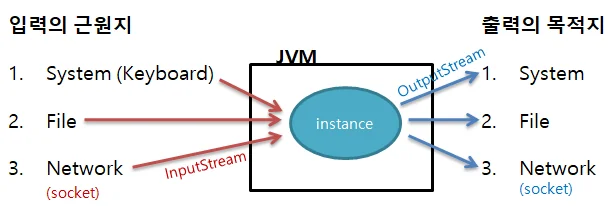
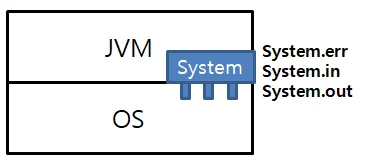
JVM이 시작될 때 자동으로 표준 error OutputStream, 표준 input InputStream, out OutputStream 이 생성된다.
이 표준 Stream을 close하면 JVM을 다시 실행할때까지 다시 Stream 연결을 못함
키보드로 입력하면 메인보드 Keyboard Buffer에 값이 들어가짐
버퍼의 크기는 256(0~255), 크기만큼 입력 가능
Enter가 떨어지면 Buffer 내용이 OS로 전달됨
cpu에 따라 입력순서를 그대로 처리하는 Little Endian, 입력순서를 거꾸로 처리하는 Big Endian 처리방식(RISC 계열 cpu(MAC계열) )이 존재.
인텔계열 cpu는 Little Endian 방식
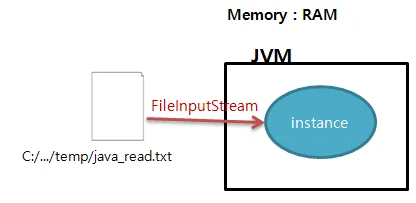
OS에 전달된 키입력 내용은 JVM의 System.in(InputStream)을 통해 JVM으로 들어오게 되고 JVM에 존재하는 instance는 InputStream의 read() 를 통해 해당 값을 읽어올 수 있다.
키보드 입력 처리
System.in
in은 InputStream
read()로 키보드로 입력된 내용을 읽어들일 수 있다.
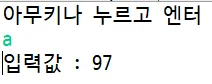
// 입력 값 중 최초 입력 문자 받기public class UseKeyboardInput { public UseKeyboardInput() { System.out.println("아무키나 누르고 엔터"); try { int input = System.in.read(); System.out.println("입력값 : " + input); } catch (IOException e) { e.printStackTrace(); } } public static void main(String[] args) { new UseKeyboardInput(); }}
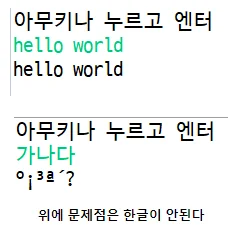
// 여러 단어 입력받기public class UseKeyboardInput { public UseKeyboardInput() { System.out.println("아무키나 누르고 엔터"); try { int input = 0; while(true) { input = System.in.read(); System.out.print((char)input); // enter는 13, 13나오면 종료 if (input == 13) { break; } } } catch (IOException e) { e.printStackTrace(); } } public static void main(String[] args) { new UseKeyboardInput(); }}
위에 입력을 찍어보면 윈도우는 엔터 입력 시 \r\n이 함께 입력됨
\r (Carriage Return) : 그 줄 맨 앞으로 이동
\n (Line Feed) : 다음 줄로 이동
한글 입력받기
한글을 입력받기위해선 8bit과 16bit Stream을 연결해야 한다.
한글은 8bit Stream을 사용하면 깨짐, 16bit Stream은 안깨짐
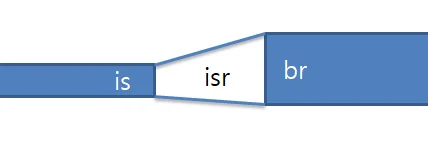
두 Stream의 크기가 달라 바로 연결 못함
두 Stream을 연결하는 Stream이 필요
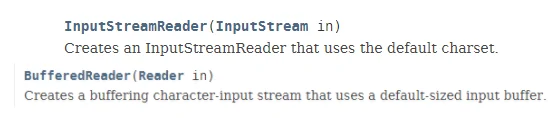
InputStream is = System.in;InputStreamReader isr = new InputStreamReader(is); // has-a BufferedReader br = new BufferedReader(isr); // is-a
InputStreamReader
8bit-16bit Stream 결합
읽어들인 charset을 변환(파라미터 2개받는 생성자 사용시)
BufferedReader
속도개선
줄단위로 읽는 기능(readLine())
// 한줄로 바꾼다면BufferedReader br = new BufferedReader( new InputStreamReader(System.in));try { // br의 readLine()을 사용하면 한줄 읽어서 String s = br.readLine();} catch (IOException ie) { ie.printStackTrace();}// 사용 후 연결을 끊어야 한다.br.close();
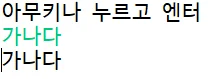
public class UseKeyboardInput { public UseKeyboardInput() { System.out.println("아무키나 누르고 엔터"); // 8bit Stream과 16bit Stream을 연결 BufferedReader br = new BufferedReader( new InputStreamReader(System.in)); try { // 16bit Stream을 사용하여 입력된 데이터를 줄단위로 읽어 들인다. String s = br.readLine(); System.out.println(s); // 스트림 사용이 끝났으면 스트림의 연결을 끊는다. br.close(); } catch (IOException ie) { ie.printStackTrace(); } } public static void main(String[] args) { new UseKeyboardInput(); }}
File 입력 처리
FileInputStream
8bit
모든 형식의 파일을 읽어들일 수 있다.
이미지, 동영상, 문서열
파일을 복사할때 사용
웹에서 파일 첨부
FileReader
16bit
독자 포맷으로 만들어지지 않은 문자열 파일만 읽어들일 수 있다.
txt (hwp, doc 등은 읽어들일 수 없다.)
파일시스템
FAT
File Allocation Table
단일파일로 4GB까지만 저장됨
USB에 파일포맷이 이거면 4GB 이상 파일을 넣을 수 없음
NTFS
NTFS (New Technology File System)
FAT 파일 시스템을 개선하여 만든 새로운 파일 시스템
exFAT
Extended File Allocation Table
Character Set
EUC-KR
한글 인코딩 방식 중 하나, 현재 산업 표준
글자 코드 세트에 쓸 문자를 현대 한국어에서 빈도가 높은 한글을 추려내어 '가'부터 '힝'까지 배당한 후 문자를 기록하는 방식
과거에 사용빈도가 많은 단어를 토대로 만듦
'아햏햏'같은 단어는 사용을 못함, '햏'이란 문자가 없기 때문에 사용을 못함.
초기 MS Office가 EUC-KR기반이었다
문서가 저장 안되는 문제가 발생
MS에서 해결하고자 만들어줌 MS949(CP949)
CP949 (code page 949)
MS Windows의 기본 코드 페이지
한글 인코딩의 한 종류, EUC-KR의 확장형
UTF-8
유니코드를 위한 가변 길이 문자열 인코딩 방식 중 하나
Universal Coded Character Set + Transformation Format - 8bit의 약자
한글은 3byte로 표기
File
java.io 패키지에서 제공하는 클래스
File에 대한 정보를 얻는 일
Directory를 생성
File 삭제
// 생성File file = new File("경로");// 길이(크기)long l = file.length(); // byte로 반환, 정수보다 큰 값을 반환가능하므로 long// 파일인지 확인할 때file.isFile();// 폴더인지 확인할 때file.isDirectory();// 읽기 가능한지 확인할 때file.canRead();// 쓰기 가능한지 확인할 때 file.canWrite();// 실행 가능한지 확인할 때file.canExecute();// 숨김파일인지 확인할 때file.isHidden();// 폴더 내 모든 폴더/파일을 얻기File[] f = file.listFiles();// 파일 삭제file.delete();// 디렉토리 생성file.mkdir(); // root부터 생성하는 디렉토리는 생성불가(과거에, 현재는 mkdirs와 동일)file.mkdirs(); // 어느 경로의 디렉토리든 생성가능// 파일의 마지막 수정날짜long date = file.lastModified();// 파일의 경로String path = file.getPath();// 파일의 파일명String fName = file.getName();// 파일의 절대경로(AbsolutePath)String aPath = file.getAbsolutePath(); // Drive 레터가 소문자, 대문자 다 됨// 파일의 규범경로(CanonicalPath), 파일에 접근하는 유일한 경로String cPath = file.getCanonicalPath(); // Drive 레터가 대문자만 가능// 파일이 존재file.exists();// 파일명 변경file.renameTo(변경할이름);
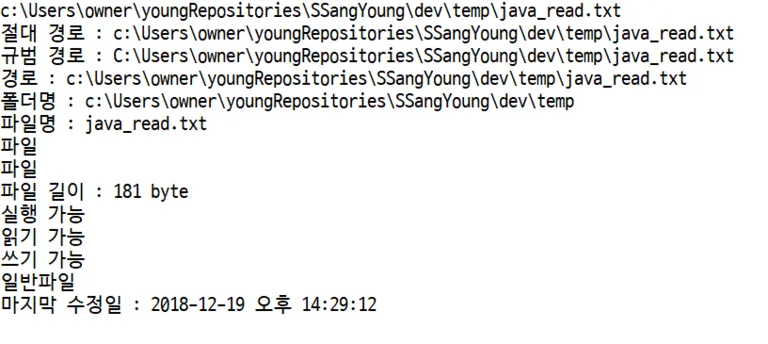
// File method사용 예제public class UseFile { public UseFile() { String path = "c:/.../temp/java_read.txt"; // 1. 생성 File file = new File(path); System.out.println(file); if (file.exists()) { // 파일이 존재할 때 System.out.println("절대 경로 : "+file.getAbsolutePath()); try { System.out.println("규범 경로 : "+file.getCanonicalPath()); } catch (IOException e) { e.printStackTrace(); } System.out.println("경로 : "+file.getPath()); System.out.println("폴더명 : "+file.getParent()); System.out.println("파일명 : "+file.getName()); System.out.println(file.isFile()?"파일":"디렉토리"); System.out.println(file.isDirectory()?"디렉토리":"파일"); System.out.println("파일 길이 : "+file.length()+" byte"); System.out.println("실행 "+(file.canExecute()?"가능":"불가")); System.out.println("읽기 "+(file.canRead()?"가능":"불가")); System.out.println("쓰기 "+(file.canWrite()?"가능":"불가")); System.out.println(file.isHidden()?"숨긴파일":"일반파일"); Date d = new Date(file.lastModified()); SimpleDateFormat sdf = new SimpleDateFormat("yyyy-MM-dd a HH:mm:ss"); System.out.println("마지막 수정일 : "+sdf.format(d)); } else { System.out.println("경로를 확인해주세요."); } } public static void main(String[] args) { new UseFile(); }}
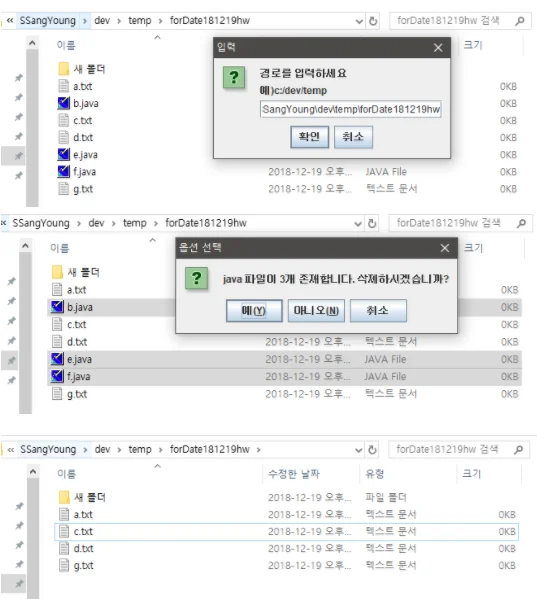
// File 생성, 삭제 예제public class UseFile2 { public void createDirectory() { File file = new File("c:/young/oh"); if (file.mkdir()) { System.out.println("폴더 생성 성공"); } else { System.out.println("같은 이름의 폴더가 존재"); } } public void removeFile() { File file = new File("C:/.../temp/a.txt"); boolean flag = file.delete(); if (flag) { System.out.println("파일 삭제 성공"); } else { System.out.println("파일 삭제 실패"); } } public static void main(String[] args) { UseFile2 uf2 = new UseFile2(); // uf2.createDirectory(); uf2.removeFile(); }}
File 내용 읽기
File을 FileInputStream을 사용해서 read()로 1byte씩 읽어온다면 한글은 깨짐.
File f = new File(경로);FileInputStream fis = new FileInputStream(f);int i = 0;while ((i = fis.read()) != -1) { // 읽어들인 내용이 있을 때까지 System.out.println(i);}
숙제1
프로그램이 실행되면 콘솔에 "디렉토리명 입력 : " 메세지가 출력
사용자가 콘솔에 디렉토리 "예) c:/dev"를 입력
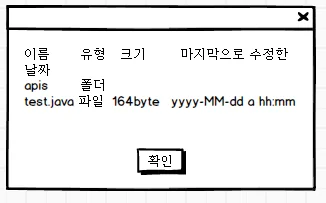
입력값이 디렉토리라면 해당 디렉토리내 파일정보를 JOptionPane.showMessageDialog에 출력