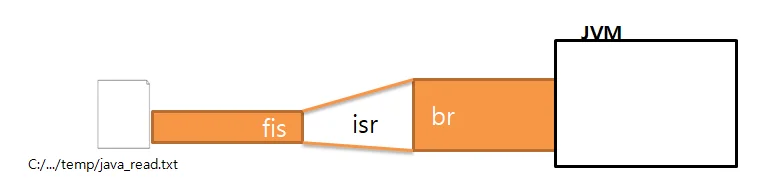
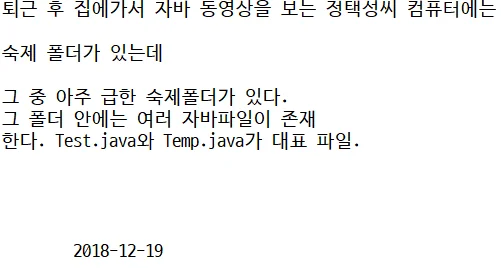
한글 처리를 하기 위해 8bit Stream과 16bit Stream을 연결하여 파일 데이터를 읽어들여야 한다.
File f = new File("c:/.../temp/java_read.txt");FileInputStream fis = new FileInputStream(f); // 파일과 연결InputStreamReader isr = new InputStreamReader(fis); // 8bit-16bit 연결BufferedReader fb = new BufferedReader(isr); // 속도개선, 줄단위 읽기String temp = "";while ((temp = br.readLine()) != null) { ... // 한줄을 읽어들인 temp를 사용}
// 한글 입력된 파일을 입력받기public class UseFileInputStream { public UseFileInputStream() { File file = new File("C:/.../temp/java_read.txt"); if (file.exists()) { try { // 스트림을 생성하여 JVM에서 HDD의 파일과 연결 // 한글처리를 위해 16bit Stream과 연결 BufferedReader br = new BufferedReader( new InputStreamReader(new FileInputStream(file))); String temp = ""; while((temp = br.readLine()) != null) { System.out.println(temp); } br.close(); } catch (FileNotFoundException fnfe) { fnfe.printStackTrace(); } catch (IOException ie) { ie.printStackTrace(); } } else { System.out.println("경로나 파일명을 확인하세요."); } } public static void main(String[] args) { new UseFileInputStream(); }}
위 코드의 문제는 연결 후 내용 처리하다가 예외 터지면 Stream close가 수행이 안될 수 있음!
finally에 close를 구현
try~catch가 중복구현되면 소스가 복잡해짐
throws로 던져버리고 호출한 곳에서 try~catch로 예외처리
이렇게 많이 구현하기 때문에 try~finally를 많이 사용
public class UseFileInputStream { public UseFileInputStream() throws IOException { File file = new File("C:/.../temp/java_read.txt"); if (file.exists()) { BufferedReader br = null; try {// FileInputStream fis = new FileInputStream(file);// InputStreamReader isr = new InputStreamReader(fis);// br = new BufferedReader(isr); br = new BufferedReader(new InputStreamReader(new FileInputStream(file))); String temp = ""; while ((temp = br.readLine()) != null) { System.out.println(temp); } } finally { if (br != null) br.close(); // 객체가 존재한다면(연결돼있다면) } } else { System.out.println("경로나 파일명을 확인하세요."); } } public static void main(String[] args) { try { new UseFileInputStream(); } catch (IOException e) { e.printStackTrace(); } }}
FileReader
원천데이터가 한글을 포함한 데이터라면 16bit Stream을 바로 사용
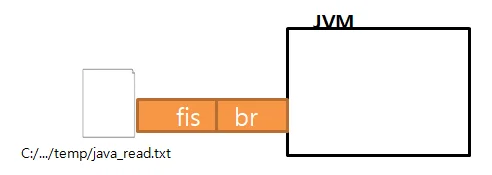
File f = new File("경로");FileReader fr = new FileReader(f); // File 객체로 바로 16bit Stream 생성BufferedReader br = new BufferedReader(fr); // 한줄 읽기 위해 fr과 br 연결
// 한줄로BufferedReader br = new BufferedReader(new FileReader(f));
// 16bit Stream만 사용하여 파일읽기public class UseFileReader { public void useFileReader() throws IOException { BufferedReader br = null; try { File f = new File("C:/.../temp/java_read.txt"); // 1. 근원지 파일에 스트림 연결 FileReader fr = new FileReader(f); // 2. 줄단위 읽어들이는 기능을 가진 스트림 연결 br = new BufferedReader(fr); String temp = ""; // 한줄씩 읽어들여 읽어들인 내용이 존재한다면 while ((temp = br.readLine()) != null) { System.out.println(temp); // 출력 } } finally { // 연결된 스트림을 끊는다. if (br != null) br.close(); } } public static void main(String[] args) { UseFileReader ufr = new UseFileReader(); try { ufr.useFileReader(); } catch (IOException e) { e.printStackTrace(); } }}
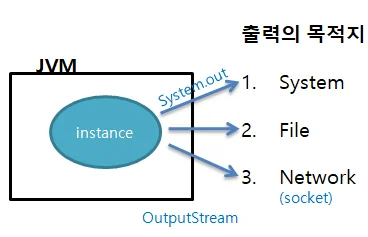
출력 스트림
File 출력
8bit Stream
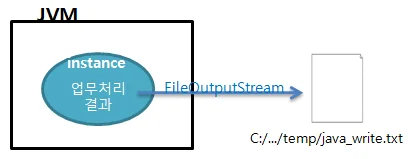
FileOutputStream
입력된 경로의 파일을 생성
없으면 생성하고 파일이 존재하면 덮어쓴다.
// 1. File 생성File file = new File("C:/.../temp/java_write.txt");// 2. Stream 생성FileOutputStream fos = new FileOutputStream(file);// 3. 스트림의 데이터를 쓴다.// write메소드는 스트림상에 데이터를 씀fos.write(정수|byte[]);// 4. 스트림에 기록된 데이터를 분출// flush를 사용해야 데이터가 스트림 밖으로 분출된다.fos.flush();// 5. 스트림을 다 사용한 후엔 닫는다.fos.close();
// JVM에서 발생한 데이터가 정수, byte[]인 경우에 File로 저장하는 FileOutputStream사용public class UseFileOutputStream { public void useFileOutputStream() throws IOException { int i = 65; // 1. File class 생성 File file = new File("C:/.../temp/java_write.txt"); // 2. FileOutputStream 생성 -> 입력된 경로에 파일이 생성된다. // 파일이 없다면 생성하고, 파일이 있다면 덮어 쓴다. FileOutputStream fos = null; try { boolean flag = false; if (file.exists()) { boolean[] temp = { false, true, true }; int select = JOptionPane.showConfirmDialog(null, "덮어쓰시겠습니까?"); flag = temp[select]; } if (!flag) { fos = new FileOutputStream(file); fos.write(i); // 값을 스트림에 기록 (수에 대한 문자가 출력됨) fos.flush(); System.out.println("파일 기록 완료"); } } finally { // 스트림에 기록된 내용이 있다면 분출하고 연결을 끊어야 함 if (fos != null) { fos.close(); } } } public static void main(String[] args) { UseFileOutputStream ufos = new UseFileOutputStream(); try { ufos.useFileOutputStream(); } catch (IOException e) { e.printStackTrace(); } }}
문자열 쓰기
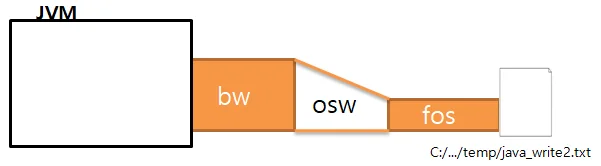
8bit Stream과 16bit Stream을 사용하면 문자열을 File에 기록가능
16bit OutputStream들은 Writer를 상속받는 클래스들
OutputStreamWriter를 사용하면 문자열을 파일로 쓸 수 있다.
속도개선을 위해 BufferedWriter를 사용
String d = "안녕!";// 1. File생성File file = new File("C:/.../temp/java_write2.txt");/*// 2. Stream 생성// 파일을 생성하는 FileOutputStream : 폴더가 없으면 FileNotFoundException 발생FileOutputStream fos = new FileOutputStream(file);// 문자열을 쓰기 위한 OutputStreamWriter : 속도가 느림OutputStreamWriter osw = new OutputStreamWriter(fos);// 느린 속도를 개선하기 위한 BufferedWriterStream 연결 BufferedWriter bw = new BufferedWriter(osw);*/// 위 과정을 한줄로 줄일 수 있다.BufferedWriter bw = new BufferedWriter(new OutputStreamWriter( new FileOutputStream(file)));// 3. Stream 기록bw.write(d);// 4. Stream에 기록된 내용을 목적지로 분출(flush)bw.flush();// 5. Stream 끊기bw.close();
/*** 8bit Stream과 16bit Stream을 연결 사용하여 문자열 데이터를* File에 기록*/public class UseFileOutputStream2 { public UseFileOutputStream2() throws IOException { String data = "오지고요 지리고요 고요고요 고요한 밤이고요"; // 1. File 객체 생성 : 파일이 존재한다면 덮어 쓸 것인지를 판단하기 위해 만듦. File file = new File("C:/.../temp/java_write2.txt"); boolean flag = false; // 파일이 없을 때 if (file.exists()) { boolean[] flagVal = { false, true, true }; // 예, 아니오, 취소 flag = flagVal[JOptionPane.showConfirmDialog(null, "덮어 쓰시겠습니까?")]; } // 2. 스트림 생성 if (!flag) { BufferedWriter bw = null; try { /*// 파일을 생성하는 Stream : FileNotFoundException이 발생(폴더가 없을 때) FileOutputStream fos = new FileOutputStream(file); // 문자열을 쓰기 위한 Stream 연결 : (속도가 느리다) OutputStreamWriter osw = new OutputStreamWriter(fos); // 느린 속도를 개선하기 위한 Stream 연결 : bw = new BufferedWriter(osw);*/ bw = new BufferedWriter(new OutputStreamWriter( new FileOutputStream(file))); bw.write(data); // 스트림에 데이터를 기록 bw.flush(); // 목적지에 파일로 분출 System.out.println("파일에 기록 완료!"); } finally { // 스트림 객체가 생성되어 있다면 연결을 끊음 if(bw!=null) { bw.close(); } } } } public static void main(String[] args) { try { new UseFileOutputStream2(); } catch (IOException e) { e.printStackTrace(); } }}
'닫기' 메뉴아이템, 윈도우 닫기 버튼클릭 시 closeMemo() 메소드 호출되도록 구현
public void closeMemo() { boolean flag = false; if (!taNoteData.equals(jm.getTaNote().getText())) { int select = JOptionPane.showConfirmDialog(jm, "변경사항이 있습니다. 저장하고 종료하시겠습니까?"); switch(select) { case JOptionPane.OK_OPTION : saveMemo(); break; case JOptionPane.NO_OPTION : break; case JOptionPane.CANCEL_OPTION : flag = true; } } if(!flag) { jm.dispose(); }}