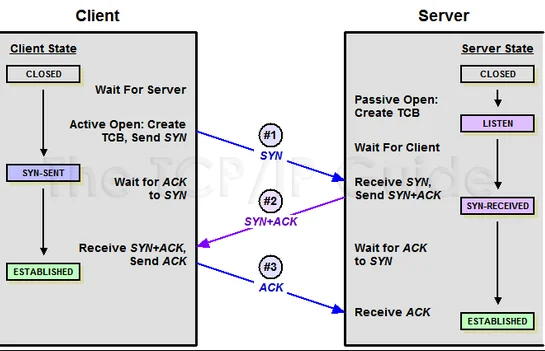
클라이언트가 서버로부터 SYN+ACK를 받으면 회신여부를 알려주기위해 ACK를 다시 서버에 보냄
이렇게 3번의 동작 수행 후 연결 = 3 Way Handshake
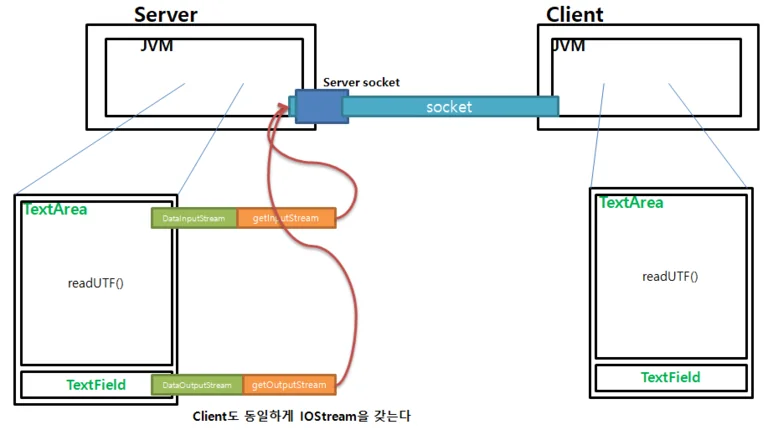
양방향 전송
서버와 클라이언트 양측에서 Socket 생성 후 DataInputStream과 DataOutputStream을 사용하여 데이터를 주고받을 수 있음
// Simple Serverpublic class SimpleServer { public SimpleServer() throws IOException { // 1. PORT를 열고 접속자가 들어오기를 기다린다. ServerSocket server = null; // 접속자에게 보내줄 메시지 String sendMsg = "누가 기침소리를 내었는가"; // 접속자가 보내온 메시지를 저장할 변수 String revMsg = ""; // 접속자에게 메시지를 보내기 위한 스트림을 선언 DataOutputStream dos = null; // 접속자가 보내오는 메시지를 읽기위한 스트림 DataInputStream dis = null; try { server = new ServerSocket(3000); System.out.println("서버 가동중 "+server); while(true) { // 3. 접속자가 들어오면 접속자 소켓을 받는다. Socket client = server.accept(); System.out.println("접속자 있음 "+client); // 4. 접속자에게 메시지를 보내기 위한 연결 dos = new DataOutputStream(client.getOutputStream()); // 5. 얻어낸 스트림에 데이터 쓰기 dos.writeUTF(sendMsg); // 6. 스트림의 데이터를 목적지(소켓)로 분출 dos.flush(); // 12. 클라이언트가 보내오는 메시지를 일기위한 스트림 연결 dis = new DataInputStream(client.getInputStream()); // 13. 스트림에서 메시지 읽기 revMsg = dis.readUTF(); JOptionPane.showMessageDialog(null, "클라이언트의 메시지\n"+revMsg); } } finally { if (server != null) server.close(); if (dos != null) dos.close(); if (dis != null) dis.close(); } } public static void main(String[] args) { try { new SimpleServer(); } catch (IOException e) { System.out.println("포트가 이미 사용중입니다."); e.printStackTrace(); } }}
// SimpleClientpublic class SimpleClient { public SimpleClient() throws UnknownHostException, IOException { // 2. 소켓을 생성 : 내 컴퓨터에 들어갈 때는 localhost 또는 127.0.0.1(루프백) // 다른 컴퓨터에 들어갈 때에는 ip address Socket client = null; // 3. 서버에서 보내오는 메시지를 읽기위한 스트림 DataInputStream dis = null; // 서버로 메시지를 보내기 위한 스트림 DataOutputStream dos = null; try { String ip = JOptionPane.showInputDialog("" + "서버 ip\n130,132.133.134,135,157,146" + ",131,141,142,143,144,155,146,148,149,151,152,153"); client = new Socket("000.00.00."+ip,3000); System.out.println("서버에 접속 하였습니다. "+client); // 7. 소켓에서 스트림 얻기 dis = new DataInputStream(client.getInputStream()); // 8. 서버에서 보내온 메시지 읽기 String revMsg = dis.readUTF(); JOptionPane.showMessageDialog(null, "서버의 메시지 : "+revMsg); // 9. 서버로 데이터를 보내기 위한 스트림을 소켓에서부터 얻는다. String sendMsg = "도대체 그대들이 이 나라의 벼슬아치들인지 아니면 뒷간의 똥막대기인지… 그걸 알 수가 없단 말이야!"; dos = new DataOutputStream(client.getOutputStream()); // 10. 준비된 메시지를 스트림에 기록 dos.writeUTF(sendMsg); // 11. 스트림에 기록된 데이터를 목적지(소켓)로 분출 dos.flush(); } finally { if(client != null) client.close(); if(dis != null) dis.close(); if(dos != null) dos.close(); } } public static void main(String[] args) { try { new SimpleClient(); } catch (UnknownHostException e) { e.printStackTrace(); } catch (IOException e) { e.printStackTrace(); } }}
채팅 프로그램
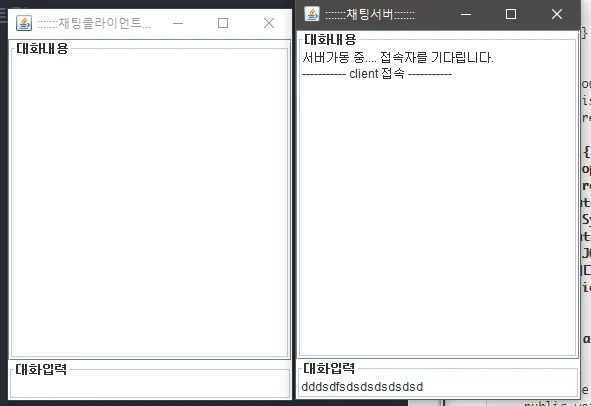
양방향 전송하는 예제처럼 채팅프로그램을 만들어 볼 수 있다.
Thread를 안쓰고 잘짜면 작동이 안되어야 한다.
DataInputStream으로부터 상대가 보낸 정보를 읽기위해 무한루프에 빠지기 때문에
Swing에선 이벤트들이 Thread처리가 되기 때문에 잘못짜면 통신이 되버린다..;
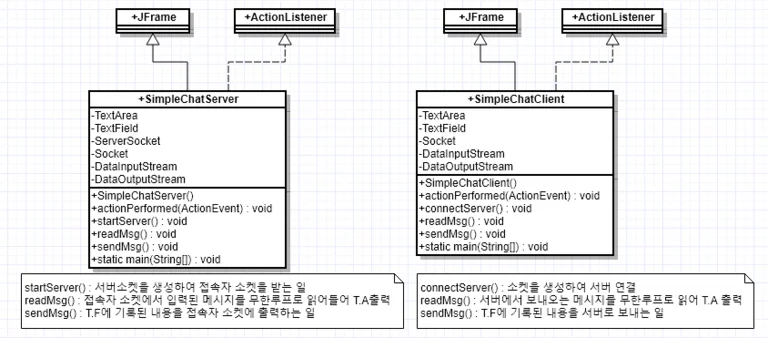
클래스 다이어그램
// SimpleChatServerpublic class SimpleChatServer extends JFrame implements ActionListener { private JTextArea jta; private JTextField jtf; private ServerSocket server; private Socket client; private DataInputStream readStream; private DataOutputStream writeStream; public SimpleChatServer() { super(":::::::채팅서버:::::::"); jta = new JTextArea(); jta.setBorder(new TitledBorder("대화내용")); jta.setEditable(false); jta.setLineWrap(true); jta.setWrapStyleWord(true); JScrollPane jsp = new JScrollPane(jta); jtf = new JTextField(); jtf.setBorder(new TitledBorder("대화입력")); add("Center", jsp); add("South", jtf); addWindowListener(new WindowAdapter() { @Override public void windowClosing(WindowEvent e) { // 화면이 종료된 후 windowClosed 호출 dispose(); } // closing처리만하면 껍데기만 죽고 소켓연결은 남아있음 // windowClosed에서 연결을 모두 끊어줘야 한다. @Override public void windowClosed(WindowEvent e) { try { close(); // 클라이언트와 연결하고 있는 스트림, 소켓, 서버소켓 종료 } catch (IOException e1) { e1.printStackTrace(); } } }); setBounds(400, 200, 300, 400); setVisible(true); jtf.requestFocus(); try { openSever(); revMsg(); } catch (SocketException se) { System.err.println("접속자가 들어오기 전 종료 "+se.getMessage()); } catch (IOException ie) { JOptionPane.showMessageDialog(this, "서버 가동 실패! 메시지를 읽어들일 수 없습니다."); ie.printStackTrace(); } // 위에서 무한 루프 처리하느라 입력이 안됨 jtf.addActionListener(this); } @Override public void actionPerformed(ActionEvent e) { try { // 접속자가 존재하여 스트림이 생성된 경우만 if (writeStream != null) { // 메시지를 보낸다. sendMsg(); } else { JOptionPane.showMessageDialog(this, "대화상대가 없습니다."); jtf.setText(""); } } catch (IOException e1) { JOptionPane.showMessageDialog(this, "메시지 전송 실패!"); e1.printStackTrace(); } } /** * 1. ServerSocket 생성(PORT 열림), 2.접속자 소켓이 들어오면(accept) * 대화를 주고 받을 수 있도록 3.Stream을 연결(DIS, DOS) */ public void openSever() throws IOException, SocketException { // 1. server = new ServerSocket(65535); jta.setText("서버가동 중.... 접속자를 기다립니다."); // 3. client = server.accept(); jta.append("\n----------- client 접속 -----------\n"); // 4. 스트림 연결 readStream = new DataInputStream(client.getInputStream()); writeStream = new DataOutputStream(client.getOutputStream()); } /** * 접속자에게 메시지를 보내는 일 * @throws IOException */ public void sendMsg() throws IOException { // T.F의 값을 가져와서 String msg = jtf.getText().trim(); // 스트림에 기록하고 writeStream.writeUTF(msg); // 스트림의 내용을 목적지로 분출 writeStream.flush(); jta.append("[server 메시지] : "+msg+"\n"); // 입력이 편하도록 jtf를 초기화 jtf.setText(""); } /** * 접속자가 보내오는 메시지를 계속 읽어 들어야 한다. * @throws IOException */ public void revMsg() throws IOException { String revMsg = ""; if (readStream != null) { while(true) { // 메시지를 읽어들여 revMsg = readStream.readUTF(); // 대화창에 출력 jta.append("[client 메시지] : "+revMsg+"\n"); } } } public void close() throws IOException { try { if(readStream != null) readStream.close(); if(writeStream != null) writeStream.close(); if(client != null) client.close(); } finally { if(server != null) server.close(); } } public static void main(String[] args) { new SimpleChatServer(); }}
// SimpleChatClientpublic class SimpleChatClient extends JFrame implements ActionListener { private JTextArea jta; private JTextField jtf; private Socket client; // 서버와 연결하기 위해 private DataInputStream readStream; // 서버의 데이터를 읽기위한 스트림 private DataOutputStream writeStream; // 서버로 데이터를 보내기위한 스트림 public SimpleChatClient() { super(":::::::채팅클라이언트:::::::"); jta = new JTextArea(); jta.setBorder(new TitledBorder("대화내용")); jta.setEditable(false); jta.setLineWrap(true); jta.setWrapStyleWord(true); JScrollPane jsp = new JScrollPane(jta); jtf = new JTextField(); jtf.setBorder(new TitledBorder("대화입력")); add("Center", jsp); add("South", jtf); addWindowListener(new WindowAdapter() { @Override public void windowClosing(WindowEvent e) { dispose(); } }); setBounds(400, 200, 300, 400); setVisible(true); jtf.requestFocus(); try { this.connectToServer(); this.revMsg(); } catch (IOException ie) { ie.printStackTrace(); } // SimpleChatServer와 동일하게 위에 revMsg()를 처리하느라 // 입력이벤트 처리가 안되버림(Thread를 사용해야 문제를 해결할 수 있음) jtf.addActionListener(this); } @Override public void actionPerformed(ActionEvent e) { try { sendMsg(); } catch (IOException ie) { ie.printStackTrace(); } } public void close() throws IOException { try { if (readStream != null) { readStream.close(); } if (writeStream != null) { writeStream.close(); } } finally { if (client != null) { client.close(); } } } /** * 2. 소켓을 생성하여 서버에 연결하고 * 대화를 읽거나 보내기 위해 4.스트림을 연결한다. * @throws IOException */ public void connectToServer() throws IOException { // 2. client = new Socket("localhost", 65535); // 4. readStream = new DataInputStream(client.getInputStream()); writeStream = new DataOutputStream(client.getOutputStream()); } /** * 서버에서 보내오는 메시지를 무한루프로 읽어 들인다. */ public void revMsg() throws IOException { String revMsg = ""; while(true) { revMsg = readStream.readUTF(); // 대화창에 읽어들인 메시지를 출력 jta.append("[server 메시지] : "+revMsg+"\n"); } } /** * 작성된 메시지를 서버로 보내는 일 */ public void sendMsg() throws IOException { // 작성된 메시지를 가져와서 String sendMsg = jtf.getText().trim(); // 스트림에 기록하고 writeStream.writeUTF(sendMsg); // 스트림의 내용을 목적지로 분출 writeStream.flush(); // 작성된 메시지를 채팅창에 올린다. jta.append("[client 메시지] : "+sendMsg+"\n"); // TextField의 내용을 삭제한다. jtf.setText(""); } public static void main(String[] args) { new SimpleChatClient(); }}