<?xml version="1.0" encoding="UTF-8"?><!DOCTYPE configuration PUBLIC "-//mybatis.org//DTD Config 3.0//EN" "http://mybatis.org/dtd/mybatis-3-config.dtd"> <!-- MyBatis의 환경설정(연동할 DB설정)을 수행 설정 정보를 properties에 넣고 하는 것과, 설정 정보를 직접 Hard Coding하는 방법이 존재 --><configuration> <environments default="development"> <environment id="development"> <transactionManager type="JDBC"/> <dataSource type="POOLED"> <property name="driver" value="oracle.jdbc.OracleDriver"/> <property name="url" value="jdbc:oracle:thin:@localhost:1521:orcl"/> <property name="username" value="scott"/> <property name="password" value="tiger"/> </dataSource> </environment> </environments> <!-- 쿼리문을 가진 XML을 연결 --> <mappers> <mapper resource="date0403/mapper/dept_mapper.xml"/> </mappers></configuration>
Mapper xml 작성(OOO_mapper.xml)
연결된 서로 다른 맵퍼에 동일한 id가 존재할 수 있음
namespace로 XML내에서 중복된 id를 사용할 수 있도록 구분
쿼리 뒤에 절대 ';'를 붙이지 않는다.
<?xml version="1.0" encoding="UTF-8" ?><!DOCTYPE mapper PUBLIC "-//mybatis.org//DTD Mapper 3.0//EN" "http://mybatis.org/dtd/mybatis-3-mapper.dtd"><mapper namespace="kr.co.sist"> <select id="selectAllDept" resultType="date0403.domain.Dept"> select deptno, dname, loc from dept </select></mapper>
설정용 xml과 연결할 Stream 사용
한글을 사용할 수 있으므로 16bit Stream(Reader) 사용
경로 입력시 src하위 경로만(패키지명부터) 입력해주면 됨
Reader r = Resources.getResourceAsReader("설정용xml경로");
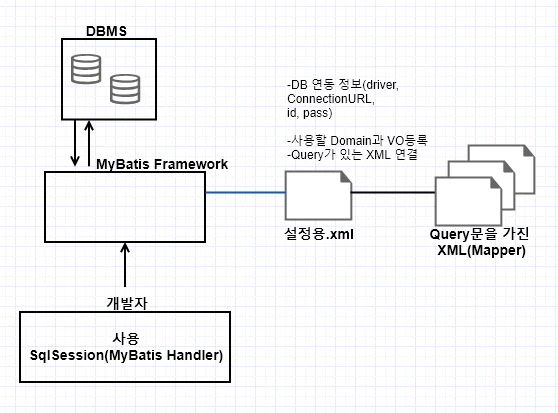
MyBatis Framework(SqlSessionFactoryBuilder) 생성
SqlSessionFactoryBuilder ssfb = new SqlSessionFactoryBuilder();
설정파일과 연결된 Stream을 할당하여 DB가 연동된 객체(SqlSessionFactory) 얻기
SqlSessionFactory ssf = ssfb.build(r);
MyBatis Handler(SqlSession)를 얻기
Handler는 쿼리를 가진 XML의 노드를 id로 찾아 parsing하여 쿼리를 수행하고 결과를 얻는 일을 수행
package date0403.domain;/*** 조회한 컬럼의 값을 저장하는 VO를 Domain이라고 한다.*/public class Dept { private int deptno; private String dname, loc; // 기본 생성자만 필요, 자동 생성되므로 생성자를 만들 필요가 없다 // (최근 버전 3.5.0은 인자있는 생성자만 있어도 된다) // 도메인은 생성자를 따로 안만들어도 된다....
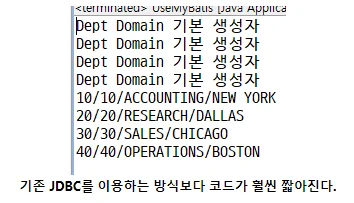
public class UseMyBatis { public void selectAllDept() throws IOException { // 1. 환경설정 xml에 스트림을 연결 Reader reader = Resources.getResourceAsReader("date0403/mybatis_config.xml"); // 2. MyBatis Framework 생성 SqlSessionFactoryBuilder ssfb = new SqlSessionFactoryBuilder(); // 3. MyBatis Framework과 DB연동한 객체를 얻기(Factory객체를 하나로 관리하면 좋다) SqlSessionFactory ssf = ssfb.build(reader); if (reader != null) { // Reader는 build후 끊어준다. reader.close(); } // 4. MyBatis Handler 얻기 SqlSession ss = ssf.openSession(); // 5. Handler를 사용하여 DB작업을 수행 List<Dept> list = ss.selectList("kr.co.sist.selectAllDept"); // id가 유일하다면 namespace 생략가능 Dept d = null; for(int i=0; i<list.size(); i++) { d = list.get(i); System.out.println(d.getDeptno()+"/" +d.getDeptno()+"/"+d.getDname()+"/"+d.getLoc()); } // 6. 사용이 종료된 SqlSession을 닫는다. ss.close(); } public static void main(String[] args) { UseMyBatis umb = new UseMyBatis(); try { umb.selectAllDept(); } catch (IOException e) { e.printStackTrace(); } }}
MyBatis - Mapper 작성법
값으로는 ${ VO getter }, #{ VO getter }를 사용한다.
$는 쿼리로 대체된다.(쿼리문으로 반영됨)
컬럼명, 테이블명
#은 바인드 변수로 대체된다.
추가
<insert id="Handler에서 찾을 ID" parameterType="패키지명.VO명"> INSERT INTO 테이블명 (컬럼명1, 컬럼명2, ...) VALUES (값1, 값2, ...)</insert>
추가 사용
ss.insert("id", VO);
업데이트
<update id="Handler에서 찾을 ID" parameterType="패키지명.VO명"> UPDATE 테이블명 SET 컬럼명=값 WHERE 컬럼명=값</update>
업데이트 사용
int cnt = ss.update("id",VO); // 업데이트를 수행한 행의 수를 반환
삭제
<delete id="Handler에서 찾을 ID" parameterType="패키지명.VO명"> DELETE FROM 테이블명 WHERE 컬럼명=값</delete>
삭제 사용
int cnt = ss.delete("id",VO); // 삭제된 행의 수를 반환
주석
쿼리부분에 SQL주석을 달 수 있다. (--, /* */)
"--"주석을 사용하면 줄바뀐 아래 쿼리들까지 주석처리된다.
MyBatis에서 "--"주석을 사용하지 말 것
조회
VO의 값으로 값을 설정하고 조회결과는 Domain에 저장한다.
<SELECT id="id" parameterType="VO" resultType="Domain"> SELECT 컬럼명, ... FROM 테이블명 WHERE 컬럼명=값</SELECT>
한행 조회
Domain d = ss.selectOne("id", VO);
여러행 조회
List<Domain> list = ss.selectList("id",VO);
MyBatis insert 예
public class UseMyBatis { // SesstionFactory를 만든는 Method를 별도로 생성 public SqlSessionFactory getSessionFactory() throws IOException { // 1. 환경설정 xml에 스트림을 연결 Reader reader = Resources.getResourceAsReader("date0403/mybatis_config.xml"); // 2. MyBatis Framework 생성 SqlSessionFactoryBuilder ssfb = new SqlSessionFactoryBuilder(); // 3. MyBatis Framework과 DB연동한 객체를 얻기(Factory객체를 하나로 관리) SqlSessionFactory ssf = ssfb.build(reader); if (reader != null) { reader.close(); } return ssf; }...
package date0403.vo; // VO패키지public class Dept { // Domain과 VO는 다른 패키지에 생성 private int deptno; private String dname, loc; // VO값을 넣기 위해 인자있는 생성자와, 값을 사용하기 위해 getter 생성 ...
... <!-- dept_mapper.xml에 statement 추가 --> <insert id="insertCpDept" parameterType="date0403.vo.Dept"> INSERT INTO cp_dept(deptno, dname, loc) VALUES(#{deptno}, #{dname}, #{loc}) </insert></mapper>
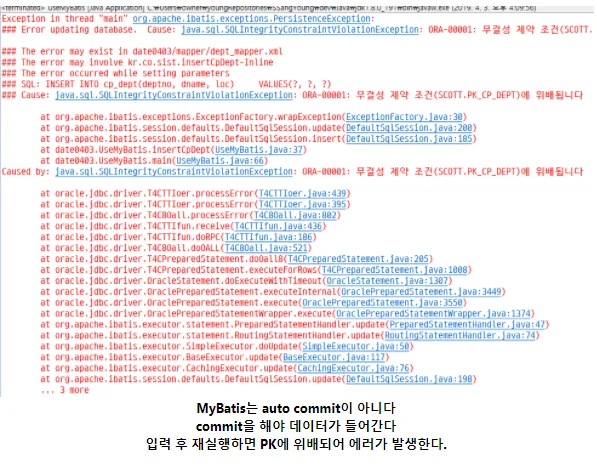
public class UseMyBatis { ... public void insertCpDept(date0403.vo.Dept d_vo) throws IOException, SQLException { // 4. MyBatis Handler 얻기 SqlSession ss = getSessionFactory().openSession(); // 5. Handler 사용하여 DB작업 수행 int cnt = ss.insert("insertCpDept", d_vo); System.out.println("추가 작업"); ss.commit(); }... public static void main(String[] args) { UseMyBatis umb = new UseMyBatis(); try { date0403.vo.Dept dvo = new date0403.vo.Dept(12,"SI개발부","나주"); umb.insertCpDept(dvo); } catch (IOException e) { e.printStackTrace(); } catch (SQLException e) { e.printStackTrace(); } }}
MyBatis update 예
... <!-- dept_mapper.xml --> <update id="updateCpDept" parameterType="date0403.vo.Dept"> UPDATE cp_dept SET dname=#{dname}, loc=#{loc} WHERE deptno=#{deptno} </update></mapper>
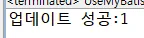
// UseMyBatis public void updateCpDept(date0403.vo.Dept d_vo) throws IOException, SQLException { // 4. MyBatis Handler 얻기 SqlSession ss = getSessionFactory().openSession(); // 5. Handler 사용하여 DB작업 수행 int cnt = ss.update("updateCpDept", d_vo); System.out.println("업데이트 성공:"+cnt); ss.commit(); }... public static void main(String[] args) { UseMyBatis umb = new UseMyBatis(); try { date0403.vo.Dept dvo = new date0403.vo.Dept(12,"SI개발부부","나주"); umb.updateCpDept(dvo); } catch (IOException e) { e.printStackTrace(); } catch (SQLException e) { e.printStackTrace(); } }}
MyBatis delete 예
... <delete id="deleteCpDept" parameterType="int"> DELETE FROM cp_dept WHERE deptno=#{deptno} </delete></mapper>
... // UseMyBatis public void deleteCpDept(int deptno) throws SQLException,IOException { // 4. MyBatis Handler 얻기 SqlSession ss = getSessionFactory().openSession(); // 5. Handler를 사용해서 DB작업을 수행 int cnt = ss.delete("deleteCpDept", deptno); ss.commit(); if (cnt == 1) { System.out.println(deptno+"번 부서정보를 삭제했습니다."); } else { System.out.println("해당 부서는 존재하지 않습니다."); } } public static void main(String[] args) { UseMyBatis umb = new UseMyBatis(); try { umb.deleteCpDept(11); } catch (IOException e) { e.printStackTrace(); } catch (SQLException e) { e.printStackTrace(); } }}