---
title: "Java EE 정리 14"
date: "2019-03-18"
tags: ["Java EE","JSP"]
status: archived
verified: false
---

---

## JSTL

* **redirect**
  * 비정상적인 요청이 발생했을 때 페이지 이동 기술 

```html
<c:redirect url="이동할 페이지 URL"/>
```

* **import**
  * 공통 코드가 아닌 **디자인인 경우 사용**
  * **지시자의 충돌이 발생하지 않는다**
  * **변수나 method가 공유되지 않는다**

```html
<c:import url="끼워넣을 JSP URL">
```

![01](/md/legacy-assets/javaEe/14/01.webp)

* **import와 동일 기능을 가진, jsp include 액션태그**
  * 공통코드를 가진 JSP를 분리하여 작성하고 필요한 곳에서 사용하기 위해 사용되는 기술
  * **include directive는 공통 코드를 합칠 때, jsp include 액션태그, JSTL import는 디자인을 합칠 때 사용**

```html
<%@ include file="..." %> <!-- 공통 코드인 경우, ex) 세션체크 -->

<jsp:include page="..." > <!-- 디자인인 경우 -->
```

* **예외처리 catch**

```html
<c:catch var="예외객체명">
    예외발생 예상코드
</c:catch>

<c:if test="${ 예외객체명 ne null }"> <!-- 'not empty 객체명'으로 조건바꿀 수 있다 -->
    예외발생 시 제공할 코드
</c:if>
```

* **redirect 사용 예**

```html
<!-- jstl_redirect_a.jsp -->
<%@ taglib prefix="c" uri="http://java.sun.com/jsp/jstl/core" %>
...
정상적인 경우 제공할 서비스<br/>
<img src="../common/images/img2.jpg"/>
<%
      boolean flag = new Random().nextBoolean();
      pageContext.setAttribute("flag", flag);
%>
<c:if test="${ flag }">
      <!-- 비정상적인 경우의 요청이 있을 때 페이지 이동 -->
      <c:redirect url="jstl_redirect_b.jsp"></c:redirect>
</c:if>    
```

```html
<!-- jstl_redirect_b.jsp -->
...
비정상적일 때 응답할 페이지<br/>
<img src="../common/images/img.png"/>
...
```

![02](/md/legacy-assets/javaEe/14/02.webp)

* **import 사용 예**

```html
<!-- jstl_import.jsp -->
<%@ taglib prefix="c" uri="http://java.sun.com/jsp/jstl/core" %>
...
외부페이지<br/>
<div>
      <c:import url="jstl_import_b.jsp"/>
</div>
외부페이지<br/>
내부 페이지 변수의 사용 : ${ week }
```

```html
<!-- jstl_import_b.jsp -->
<%@ page language="java" contentType="text/html; charset=UTF-8"
    pageEncoding="UTF-8"
    info="지시자의 충돌이 발생하지 않는다."%>

공통 디자인 정의<br/>
<%
      String week = "오늘은 월요일입니다.";
      pageContext.setAttribute("week", week);
%>
<strong>${ week }</strong>
```

![03](/md/legacy-assets/javaEe/14/03.webp)

* **catch 사용 예**
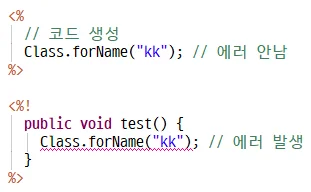
      * **scriptlet내용은 Java파일로 변경되면서 _jspService안에 코드로 생성된다.**
      * scrriptlet안에 내용은 try~catch문으로 감싸여 있어서 코드 에러가 발생하지 않는다.
      * 반면에 declaration으로 메소드를 생성 후 에러코드를 넣으면 예외처리를 안했기 때문에 에러가 발생한다.
![04](/md/legacy-assets/javaEe/14/04.webp)

```html
<!-- jstl_catch.jsp -->
<%@ taglib prefix="c" uri="http://java.sun.com/jsp/jstl/core" %>
...
<c:catch var="e">
<%
      Class.forName("kk"); 
      // 예외를 throws하는 method를 호출하더라도  _jspService()가
      // 코드를 try~catch로 감싸고 있기 때문에 코드 에러가 발생하지 않는다.
%>
</c:catch>
<c:if test="${ not empty e }">
      서비스도중 문제가 발생하였습니다. ${ e }
</c:if>
```

![05](/md/legacy-assets/javaEe/14/05.webp)

## JSTL - fmt

* **형식을 가진 문자열을 만드는 Tag Library**
* **지시자**

```html
<%@ taglib prefix="fmt" uri="http://java.sun.com/jsp/jstl/fmt"/>
```


* **날짜형식 변경**
  * 브라우저로 출력된다.
  * **fmt - prefix/ formatDate - suffix**

```html
<fmt:formatDate value="date 객체" pattern="SimpleDateFormat Pattern과 동일"/>
```

* **숫자형식 변경**

```html
<fmt:formatNumber value="숫자" pattern="DecimalFormat Pattern과 동일" />
<!--
    pattern값은 DecimalFormat에서 제공하는 pattern을 사용
    데이터가 없을 때 0을 출력하고자 한다면 '0'(오라클은 0)
    데이터가 없을 때 출력하지 않고자 한다면 '#'(오라클은 9)
-->
```

* **fmt formatDate 사용 예**

```html
<!-- jstl_formatdate.jsp -->
<%@ taglib prefix="fmt" uri="http://java.sun.com/jsp/jstl/fmt" %>
...
<%
      Date date = new Date();
      pageContext.setAttribute("pageDate", date);
%>

<!-- EL 사용 -->
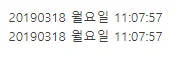
<fmt:formatDate value="${ pageDate }" pattern="yyyyMMdd EEEE  HH:mm:ss"/><br/>

<!-- Expression 사용 -->
<fmt:formatDate value="<%= date %>" pattern="yyyyMMdd EEEE  HH:mm:ss"/><br/>
```

![06](/md/legacy-assets/javaEe/14/06.webp)

* **fmt formatNumber 사용 예**

```html
<!-- jstl_formatnumber.jsp -->
<%@ taglib prefix="fmt" uri="http://java.sun.com/jsp/jstl/fmt" %>
...
<%
      int i = 20190318;
      int j = 2019;
      
      pageContext.setAttribute("i", i);
      pageContext.setAttribute("j", j);
%>
<fmt:formatNumber value="${ i }" pattern="#,###"/><br/>
<fmt:formatNumber value="${ j }" pattern="#,###"/><br/>
```

![07](/md/legacy-assets/javaEe/14/07.webp)

* **#은 있는 데이터만 출력, 0은 없는 데이터도 출력**

```html
<fmt:formatNumber value="${ i }" pattern="###,###,###,###"/><br/>
<fmt:formatNumber value="${ j }" pattern="0,000,000,000"/><br/>
```

![08](/md/legacy-assets/javaEe/14/08.webp)

## 달력 만들기

* **지금까지 배운 내용 총정리**
* 다음 캘린더와 비슷하게 만들 것
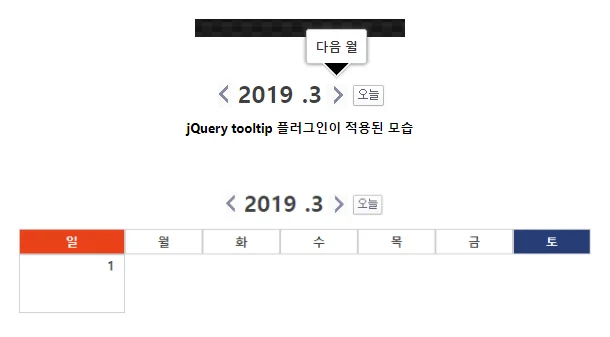
![09](/md/legacy-assets/javaEe/14/09.webp)

* **초기 디자인**

```html
<!-- diary.jsp -->
...
<style type="text/css">
      #diaryTab { margin: 0px auto; border-spacing: 0px;    }
      
      .sunTitle {
            width: 80px;
            height:25px;
            border:1px solid #CECECE;
            background-color: #e84118;
            font-weight:bold;
            color: white;     
      }
      .weekTitle { width: 80px; height:25px; border:1px solid #CECECE; }
      .satTitle {
            width: 80px;
            height:25px;
            border:1px solid #CECECE;
            background-color: #273c75;
            color: white;
      }
      
      #diaryTitle {
            text-align: center;
            margin-bottom: 10px;
            margin-tom: 20px;
      }
      
      #diaryToday {
            width:100px;
            font-family: 고딕체;
            font-size:24px;
            font-weight: bold;
            vertical-align: bottom;
      }
      
      .diaryTd {
            width: 100px;
            height: 60px;
            border: 1px solid #CECECE;
            text-align: right;
            vertical-align: top;
            font-size: 14px;
            font-weight: bold;
            padding-right: 10px;
      }


      /* jQuery tooltip 플러그인 */
      .ui-tooltip, .arrow:after {
        background: black;
        border: 2px solid white;
      }
      .ui-tooltip {
        padding: 10px 20px;
        color: white;
        border-radius: 20px;
        font: bold 14px "Helvetica Neue", Sans-Serif;
        text-transform: uppercase;
        box-shadow: 0 0 7px black;
      }
      .arrow {
        width: 70px;
        height: 16px;
        overflow: hidden;
        position: absolute;
        left: 50%;
        margin-left: -35px;
        bottom: -16px;
      }
      .arrow.top {
        top: -16px;
        bottom: auto;
      }
      .arrow.left {
        left: 20%;
      }
      .arrow:after {
        content: "";
        position: absolute;
        left: 20px;
        top: -20px;
        width: 25px;
        height: 25px;
        box-shadow: 6px 5px 9px -9px black;
        -webkit-transform: rotate(45deg);
        -ms-transform: rotate(45deg);
        transform: rotate(45deg);
      }
      .arrow.top:after {
        bottom: -20px;
        top: auto;
      }
</style>
<link rel="stylesheet"  href="//code.jquery.com/ui/1.12.1/themes/base/jquery-ui.css">
<script  src="https://ajax.googleapis.com/ajax/libs/jquery/2.2.4/jquery.min.js"></script>
<script src="https://code.jquery.com/ui/1.12.1/jquery-ui.js"></script>
<script>
$( function() {
  $( document ).tooltip({
    position: {
      my: "center bottom-20",
      at: "center top",
      using: function( position, feedback ) {
        $( this ).css( position );
        $( "<div>" )
          .addClass( "arrow" )
          .addClass( feedback.vertical )
          .addClass( feedback.horizontal )
          .appendTo( this );
      }
    }
  });
} );
</script>
...
<div id="diaryWrap">
<%
      Calendar cal = Calendar.getInstance();
      int nowYear = cal.get(Calendar.YEAR);
      int nowMonth = cal.get(Calendar.MONTH)+1;
      int nowDay = cal.get(Calendar.DAY_OF_MONTH);
      
      pageContext.setAttribute("nowYear", nowYear);
      pageContext.setAttribute("nowMonth", nowMonth);
      pageContext.setAttribute("nowDay", nowDay);
%>
<div id="diaryTitle">
      <img src="images/btn_prev.png" title="이전 월"/>
      <span id="diaryToday" title="${ nowYear }년 ${ nowMonth }월">
            <c:out value="${ nowYear }"/>
            .<c:out value="${ nowMonth }"/></span>
      <img src="images/btn_next.png" title="다음 월"/>
      <img src="images/btn_today.png" title="오늘"/>
      
</div>
<div id="diaryContent">
      <table id="diaryTab">
            <tr>
                  <th class="sunTitle">일</th>
                  <th class="weekTitle">월</th>
                  <th class="weekTitle">화</th>
                  <th class="weekTitle">수</th>
                  <th class="weekTitle">목</th>
                  <th class="weekTitle">금</th>
                  <th class="satTitle">토</th>
            </tr>
            <tr>
                  <td class="diaryTd">1</td>
            </tr>
      </table>
</div>
</div>
```

* **Calendar 사용**
  * Singleton 패턴, 인스턴스 얻어 사용

```java
Calendar cal = Calendar.getInstance();
```

* **마지막 날 얻기**
  * **이번 달에 없는 날짜가 입력되면 달력은 다음달 1일로 설정이 된다.**

```java
for(int i=1; ; i++) {
    cal.set(Calendar.DAY_OF_MONTH, i);
    if(cal.get(Calendar.DAY_OF_MONTH) != i) { 
        // 예로 32일이 들어가면 없는 날이라 첫날(1)로 돌아감, 반복문을 빠져나온다.
        break;
    }
    // 마지막 날을 저장해서 사용
}
```

* **현재 날짜랑 tempDay랑 같지 않음으로 마지막 날을 알 수 있다**

```html
<tr>
      <%
            for(int tempDay = 1; tempDay < 33;tempDay++) {
                  cal.set(Calendar.DAY_OF_MONTH, tempDay);  
                  out.println(cal.get(Calendar.DAY_OF_MONTH)+"/"+tempDay+"<br/>");
            }
      %>
</tr>
```

![10](/md/legacy-assets/javaEe/14/10.webp)

* **토요일이면 줄을 바꿔줘야 한다.**
  * **딱 떨어지는 수를 비교할 땐 switch case문을 사용**

```java
switch (cal.get(Calendar.DAY_OF_WEEK)) {
case Calendar.SATURDAY :
    out.println("</tr><tr>");                                          
}
```

```html
<div id="diaryContent">
      <table id="diaryTab">
            <tr>
                  <th class="sunTitle">일</th>
                  <th class="weekTitle">월</th>
                  <th class="weekTitle">화</th>
                  <th class="weekTitle">수</th>
                  <th class="weekTitle">목</th>
                  <th class="weekTitle">금</th>
                  <th class="satTitle">토</th>
            </tr>
            <tr>
                  <%
                        // 매월마다 끝나는 날짜가 다르기 때문에
                        for(int tempDay = 1; ;tempDay++) {
                              // 임시일자를 설정
                              cal.set(Calendar.DAY_OF_MONTH, tempDay);      
                              if (cal.get(Calendar.DAY_OF_MONTH) !=  tempDay) {
                                    // 설정된 날짜가 현재일자가 아니라면 다음 달 1일
                                    // 다음달이면 반복문을 빠져나간다.
                                    break;
                              }
                  %>
                  <td class="diaryTd"><%= tempDay %></td>
                  <%
                              switch (cal.get(Calendar.DAY_OF_WEEK)) {
                              case Calendar.SATURDAY :
                                    out.println("</tr><tr>");
                              }
                        }
                  %>
            </tr>
      </table>
</div>
```

![11](/md/legacy-assets/javaEe/14/11.webp)


* **1일을 출력하기 전, 시작요일에 맞게 공백을 출력해야 함.**
      * **1일인 경우에 공백을 넣어주는 코드를 앞에 넣어줘야 함**
      * 월마다 찍는 공백의 수는 다름

```java
// for 반복문 안에서
if ( i == 1 ) { // 이번에 찍을 날짜가 1일이라면 1일의 요일까지 공백넣기
    for(int j=1; j < cal.get(Calendar.DAY_OF_WEEK); j++) {
        out.println("<td></td>");
    }
}
```

```java
...
<%! // declaration, 필드에 상수 생성
      public static final int START_DAY = 1;
%>
...
      <tr>
            <%
                  for(int tempDay = 1; ;tempDay++) {
                        cal.set(Calendar.DAY_OF_MONTH, tempDay);
                        if (cal.get(Calendar.DAY_OF_MONTH) != tempDay) {
                              break;
                        }
                        // 1일을 출력하기 전 1일 요일까지 공백 출력
                        switch(tempDay) {
                        case START_DAY:
                              for(int blankTd=1; blankTd < cal.get(Calendar.DAY_OF_WEEK); blankTd++) {
                                    out.println("<td  class='diaryTd'></td>");
                              }
                        }
            %>
            <td class="diaryTd"><%= tempDay %></td>
            <%
                        switch (cal.get(Calendar.DAY_OF_WEEK)) {
                        case Calendar.SATURDAY :
                              out.println("</tr><tr>");
                        }
                  }
            %>
      </tr>
</table>
```

![12](/md/legacy-assets/javaEe/14/12.webp)


* **마지막날 이후에 공백 만들기**
      * 빠져나가기 전에 만들어야 한다.

```java
if(cal.get(Calendar.DAY_OF_MONTH) != tempDay) { // 마지막 날짜를 넘고서
    for(int j=cal.get(Calendar.DAY_OF_WEEK); j<8; j++) { // SAT(7)까지 공백넣기
        out.println("<td></td>");
    }
    break;
}
```

```java
...
      <tr>
            <%
                  // 매월마다 끝나는 날짜가 다르기 때문에
                  for(int tempDay = 1; ;tempDay++) {
                        cal.set(Calendar.DAY_OF_MONTH, tempDay);  //  임시일자를 설정
                        if (cal.get(Calendar.DAY_OF_MONTH) != tempDay) {
                              // 설정된 날짜가 현재일자가 아니라면  마지막 일자 다음달 1일이므로 반복문을 빠져나간다.
                              
                             for(int blankTd=cal.get(Calendar.DAY_OF_WEEK); blankTd<8; blankTd++) {
                                    out.println("<td  class='blankTd'></td>");
                              }
                              break;
                        }
                        
                        // 1일을 출력하기 전 공백 출력
                        switch(tempDay) {
                        case START_DAY:
                              for(int blankTd=1;  blankTd<cal.get(Calendar.DAY_OF_WEEK); blankTd++) {
                                    out.println("<td  class='blankTd'></td>");
                              }
                        }
            %>
            <td class="diaryTd"><%= tempDay %></td>
            <%
                        switch (cal.get(Calendar.DAY_OF_WEEK)) {
                        case Calendar.SATURDAY :
                              out.println("</tr><tr>");
                        }
                  }
            %>
      </tr>
</table>
```

![13](/md/legacy-assets/javaEe/14/13.webp)


* **토요일, 일요일 글자색을 바꾸기**

```html
...
.sunColor {
      color: #e84118;
      font-size:15px;
}
.satColor {
      color: #273c75;
}
.weekColor {
      color: #333;
}
</style>
...
      String dayClass="";
...
            // 요일별 색 설정
            switch(cal.get(Calendar.DAY_OF_WEEK)) {
            case Calendar.SUNDAY:
                  dayClass="sunColor";
                  break;
            case Calendar.SATURDAY:
                  dayClass="satColor";
                  break;
            default:
                  dayClass="weekColor";
            }
            
            pageContext.setAttribute("dayClass", dayClass);
%>
<td class="diaryTd"><span class="${ dayClass }"><%= tempDay  %></span></td>
<%
...
```

![14](/md/legacy-assets/javaEe/14/14.webp)


* **a태그 href 속성값 #void와 #의 차이**
      * **#void는 눌러도 제자리(아무반응없이)**
      * **#은 페이지를 갱신해서 스크롤이 아래로 내려가 있었다면 페이지 위로 올라옴**
* **이전, 다음 달로 이동**
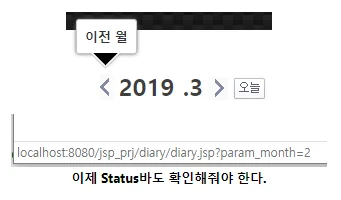
  * 쿼리스트링에 파라미터로 이동할 달 페이지 요청

```html
<a href="diary.jsp?param_month=${ nowMonth-1 }"><img  src="images/btn_prev.png" title="이전 월"/></a>
```

![15](/md/legacy-assets/javaEe/14/15.webp)

```java
<%
      Calendar cal = Calendar.getInstance();
      int nowYear = cal.get(Calendar.YEAR);
      int nowMonth = 0;
      int nowDay = cal.get(Calendar.DAY_OF_MONTH);
      
      String paramMon = request.getParameter("param_month");
      if (paramMon != null) { // 파라미터 월이 존재한다면 현재 켈린더 객체의 월을 변경
            cal.set(Calendar.MONTH, Integer.parseInt(paramMon)-1);
      }
      
      nowMonth = cal.get(Calendar.MONTH)+1;
      
      pageContext.setAttribute("nowYear", nowYear);
      pageContext.setAttribute("nowMonth", nowMonth);
      pageContext.setAttribute("nowDay", nowDay);
%>
```


* **문제는 2019년으로만 유지됨**
      * **parameter로 '년'도 추가**
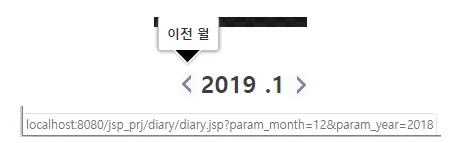
      * 1월일 때 12월 이동할 때 상태바로 파라미터가 제대로 전달되는지 확인

```html
int nowYear = 0;
...
String paramYear = request.getParameter("param_year");
if (paramYear != null) {
      cal.set(Calendar.YEAR, Integer.parseInt(paramYear));
}
nowYear = cal.get(Calendar.YEAR);
...
<a href="diary.jsp?param_month=${ nowMonth-1 eq 0 ? 12 : nowMonth-1  }&param_year=${ nowMonth-1 eq 0 ? nowYear-1 : nowYear }"><img  src="images/btn_prev.png" title="이전 월"/></a>
```

![16](/md/legacy-assets/javaEe/14/16.webp)

* **이번엔 JavaScript로 월 이동 구현**

```html
<script type="text/javascript">
      function moveMonth(month, year) { // JS로 페이지 이동
            location.href="diary.jsp?param_month="+month+"&param_yaer="+year;
      }
</script>
...
<a onclick="moveMonth(${ nowMonth-1 eq 0 ? 12 : nowMonth-1 },${  nowMonth-1 eq 0 ? nowYear-1 : nowYear })"><img src="images/btn_prev.png"  title="이전 월"/></a>
```

* **폼으로 넘기기**
  * hidden태그로 post방식으로 전달

```html
<script type="text/javascript">
      function moveMonth(month, year) {
            var obj = document.diaryFrm;
            obj.param_month.value = month;
            obj.param_year.value = year;
            
            obj.submit();
      }
</script>
...
<form action="diary.jsp" name="diaryFrm" method="post">
      <input type="hidden" name="param_month"/>
      <input type="hidden" name="param_year"/>
</form>
...
<a href="#void" onclick="moveMonth(${ nowMonth == 13 ? 1 : nowMonth+1  },${ nowMonth == 13 ? nowYear+1 : nowYear })"><img  src="images/btn_next.png" title="다음 월"/></a>
```

* **위 함수를 jQuery로 바꾸면**

```html
<script type="text/javascript">
      function moveMonth(month,year) {
            $("[name='param_year']").val(year);
            $("[name='param_month']").val(month);
            $("[name='diaryFrm']").submit();
      }
</script>
```


* **오늘로 이동**
  * jsp 요청 시 파라미터 없으면 오늘로 이동한다.

```html
<a href="diary.jsp"><img src="images/btn_today.png" title="오늘"/></a>
```

* **오늘로 이동 - JS함수로 이동**
  * 함수에 empty값 전달해서 이동 시 empty일 때 예외처리를 해줘야 에러가 없다

```html
<a href="#void" onclick="moveMonth('','')"><img  src="images/btn_today.png" title="오늘"/></a>
```

```java
...
String paramMon = request.getParameter("param_month");
if (paramMon != null && !"".equals(paramMon)) { // "" empty 조건 추가
      cal.set(Calendar.MONTH, Integer.parseInt(paramMon)-1);
}
String paramYear = request.getParameter("param_year");
if (paramYear != null && !"".equals(paramYear)) { // "" empty 조건 추가
      cal.set(Calendar.YEAR, Integer.parseInt(paramYear));
}
...
```

* **숙제1 - 오늘을 표현하기(색상)**

```java
Calendar cal = Calendar.getInstance();
Calendar todayCal = Calendar.getInstance();
int currYear = todayCal.get(Calendar.YEAR);
int currMon = todayCal.get(Calendar.MONTH);
int currDay = todayCal.get(Calendar.DAY_OF_MONTH);
...
if(currYear == cal.get(Calendar.YEAR) && currMon ==  cal.get(Calendar.MONTH) && currDay == tempDay) {
      todayClass = "today";
} else {
      todayClass = "";
}

pageContext.setAttribute("todayClass", todayClass);
```

```html
<td class="diaryTd ${ todayClass }"><span class="${ dayClass }"><%=  tempDay %></span></td>
```

![17](/md/legacy-assets/javaEe/14/17.webp)


* **숙제2 - 마지막 날이 토요일이면 다음 줄의 공백생성을 막아라**

```java
int lastDay=0;
...
      for(int tempDay = 1; ;tempDay++) {
            cal.set(Calendar.DAY_OF_MONTH, tempDay);  
            if (cal.get(Calendar.DAY_OF_MONTH) != tempDay) {
                  
                  for(int  blankTd=cal.get(Calendar.DAY_OF_WEEK); blankTd<8; blankTd++) {
                        if (lastDay == Calendar.SATURDAY) { 
                              // 마지막날이 토요일이면 빠져나옴
                              break; 
                        }
                        out.println("<td  class='blankTd'></td>");
                  }
                  break;
            }
...
            // 마지막날 저장
            lastDay = cal.get(Calendar.DAY_OF_WEEK); 
      }
%>
```

![18](/md/legacy-assets/javaEe/14/18.webp)

* **숙제3 -  마지막 날 이후에 다음달의 일자를 1, 2, 3, 4 일 등 공백에 출력**

```java
...
if (cal.get(Calendar.DAY_OF_MONTH) != tempDay) {
      int nextCnt = 1; // 다음달 시작 날짜
      for(int blankTd=cal.get(Calendar.DAY_OF_WEEK); blankTd<8;  blankTd++) {
            if (lastDay == Calendar.SATURDAY) {
                  break;
            }
            out.print("<td class='blankTd'>");
            out.print(nextCnt); // 시작날짜를 찍고 
            out.println("</td>");
            nextCnt++; // 증가시킴
      }
      break;
}
...
```

* **숙제4 - 1일 이전에 이전 달의 마지막 일자부터 출력.**

```java
// 1일을 출력하기 전 공백 출력
switch(tempDay) {
case START_DAY:
      Calendar prevCal = Calendar.getInstance(); // 지난 달을 저장할 Calendar 객체
      prevCal.set(Calendar.MONTH, cal.get(Calendar.MONTH)-1); //  지난달로 설정
      
      int prevLastDay = 0;
      for(int temp = 1; ;temp++) { // 지난 달 마지막 날까지 반복
            prevCal.set(Calendar.DAY_OF_MONTH, temp); 
            if(prevCal.get(Calendar.DAY_OF_MONTH) != temp) { // 다음달로 바뀔 때까지
                  break;
            }
            prevLastDay = prevCal.get(Calendar.DATE); // 마지막 날짜 저장
      }
      
      int cnt = -1;
      for(int blankTd=1; blankTd<cal.get(Calendar.DAY_OF_WEEK);  blankTd++) {
            cnt++; // 공백의 수를 카운트
      }                             
      
      for(int blankTd=1; blankTd<cal.get(Calendar.DAY_OF_WEEK);  blankTd++) {
            out.print("<td class='blankTd'>");
            out.print(prevLastDay - cnt); // 마지막날짜 - 공백 수
            out.println("</td>");
            cnt--;
      }
}
```